Email Webhooks TempMail
TempMail supports two delivery modes per address: Inbound (default) and Inbound + webhook. You can change this via the Settings button in the mail UI. We are currently working on the redirect mode (forward email).
Modes
- Inbound: incoming emails are stored normally. Nothing is sent to any webhook.
- Inbound + webhook: the system attempts to send the email to your webhook endpoint first. If it fails (network error or non-2xx status), it falls back to normal Inbound behavior.
Generic webhook payload
Your endpoint will receive a JSON POST like this:
{
"address": "to@tmail.example",
"to": "to@tmail.example",
"from": "sender@example.com",
"subject": "Subject line",
"text": "Plain text body (may be empty)",
"html": "HTML body (may be empty)",
"date": "RFC date header or ISO string"
}
"address": "to@tmail.example",
"to": "to@tmail.example",
"from": "sender@example.com",
"subject": "Subject line",
"text": "Plain text body (may be empty)",
"html": "HTML body (may be empty)",
"date": "RFC date header or ISO string"
}
Discord webhooks
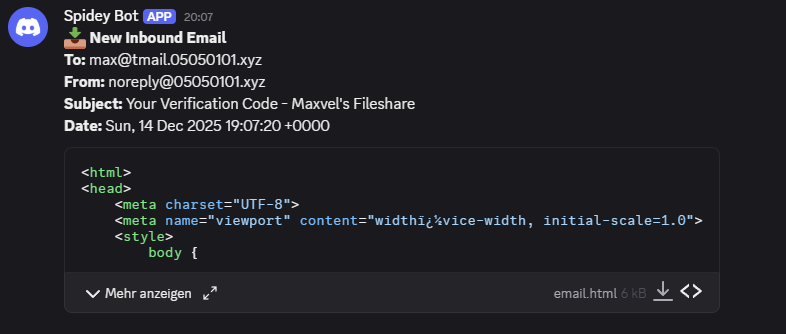
If the redirect URL looks like a Discord webhook (e.g. https://discord.com/api/webhooks/...),
TempMail sends a multipart/form-data request with a short message and an attached email.html file.
Tips
- Return HTTP 2xx to confirm delivery.
- Make sure your webhook is reachable from Cloudflare (public URL).
- If you change from Inbound + webhook to Inbound, the
webhookfield is removed from the DB.